Email Security Best Practices: Protecting Your Digital Communications
Discover essential email security best practices to protect your digital communications from threats like phishing, malware, and data breaches.

Email Security Best Practices
Email has become the front door to nearly every online account we own. From online banking and social media logins to shopping receipts and job applications, a single inbox often holds years of personal data. That convenience is exactly why email is also one of the biggest targets for hackers, spammers, and identity thieves.
Good email security is not complicated, but it does require a few smart habits and the right tools. This guide breaks down practical best practices that protect your digital identity, keep your inbox clean, and help you stay safe online.
Rethinking Email Security: Ten Ideas That May Surprise You
Many readers assume email safety is mostly about using a strong password. In reality, modern email security goes far beyond that. Here are ten facts that challenge common beliefs:
-
Phishing is a larger threat than password cracking Most compromised accounts are the result of trick emails, not sophisticated technical attacks.
-
Not all two-factor authentication works the same SMS codes help, but authenticator apps and security keys provide much stronger protection.
-
A cluttered inbox increases your risk The more newsletters and signups tied to your main address, the easier it is to miss a dangerous message.
-
Temporary email addresses can be safer for one-time use Using a disposable email for low-value registrations limits where attackers can reach you.
-
Email tracking happens every day Marketing pixels and analytics scripts allow companies to monitor when and where you open messages.
-
Blocking attachments entirely is not realistic Smart scanning and careful clicking are more practical than refusing files altogether.
-
Attackers now use AI to craft better scams Fraudulent emails are becoming more natural and personalized, making awareness even more important.
-
Security updates matter as much as login details Outdated mail apps and browsers often create vulnerabilities on otherwise safe accounts.
-
Email authentication protects senders and receivers Protocols like SPF, DKIM, and DMARC help prove that legitimate messages are really coming from trusted domains.
-
Human judgment remains a critical defense Even the best spam filters cannot replace cautious, informed users.
Understanding these realities helps you focus on the protections that actually make a difference.
The Five Core Pillars of Email Security
Whether you manage a business mailbox or a personal inbox, reliable protection rests on five foundational pillars. Think of these as the backbone of safe electronic communication.
1. Account Protection
Your first line of defense is how you access email.
- Use long, unique passwords
- Enable multi-factor authentication
- Avoid reusing credentials across websites
- Log out of shared or public computers
- Keep recovery options up to date
If someone gets into your inbox, they can reset nearly any account you own. Securing the login is essential to protecting your online privacy.
2. Spam and Identity Control
Every time you give out your real address, you create a permanent link between your identity and a website.
Smart habits include:
- Sharing your main email only with trusted services
- Using email aliases for subscriptions
- Relying on disposable email addresses for one-time signups
- Separating personal, financial, and promotional communication
Tools like temporary email reduce spam exposure and prevent your primary inbox from being added to mass marketing databases. This keeps your digital footprint smaller and easier to manage.
3. Threat Detection
Modern mail providers use automated systems to detect dangerous content.
Key protections are:
- Anti-phishing filters
- Malware scanning for attachments
- Domain reputation checks
- Suspicious link warnings
Still, filters are not perfect. Learning to recognize red flags — urgent requests, unknown senders, odd formatting — adds a valuable extra layer of safety.
4. Secure Communication Practices
How you handle messages is just as important as how they are stored.
Follow these guidelines:
- Never click verification links you did not request
- Inspect sender details carefully
- Download files only from known contacts
- Use encrypted email when sharing sensitive information
- Confirm unusual requests through another channel
Transport security standards such as TLS encryption protect mail while it moves across the internet. For highly confidential conversations, end-to-end encryption provides even stronger privacy guarantees.
5. Ongoing Maintenance
Email security is not a set-it-and-forget-it task.
Regular maintenance should include:
- Updating mail apps and operating systems
- Reviewing connected devices
- Monitoring login history
- Removing unused accounts
- Backing up important messages
Staying current prevents small weaknesses from turning into serious problems.
Practical Best Practices for Everyday Users
To make things simple, here is a clear checklist anyone can apply immediately.
Inbox Hygiene
- Keep your primary inbox for important contacts only
- Avoid signing up for freebies with your real address
- Delete suspicious mail instead of interacting with it
- Use a spam-prevention strategy like disposable email
- Unsubscribe from services you no longer use
A clean mailbox makes it easier to spot real threats and reduces long-term tracking.
Authentication Safety
- Turn on MFA or passkeys
- Use password managers
- Create unique credentials
- Avoid public Wi-Fi for sensitive mail
- Never share OTP codes
These habits directly protect your personal data and email privacy.
Safe Clicking Rules
- Be skeptical of urgent messages
- Hover over links before opening
- Avoid attachments from unknown senders
- Watch for grammar and logo inconsistencies
- When in doubt, open the website manually instead
This approach helps you resist phishing attempts and online scams.
Email Security for Businesses and Developers
Organizations have extra responsibilities. Business email accounts often hold customer records, invoices, contracts, and internal communication. That requires a more structured plan.
Corporate-Level Practices
- Enforce MFA for all employees
- Use professional email domains
- Configure SPF, DKIM, and DMARC
- Deploy secure email gateways
- Train staff to recognize phishing
- Limit administrative privileges
- Keep detailed audit logs
Proper email authentication also improves trust with customers and protects your brand reputation. When recipients see verified senders, they are more confident interacting with genuine messages.
Developer and QA Workflows
Temporary email is widely used in software testing. Public disposable inboxes allow developers to check verification flows without creating real accounts. This is a legitimate use case for quality assurance and automated testing.
However, these public inboxes should never be used for private client communication or internal company data.
Where Temporary Email Fits Into Email Security
Disposable email addresses play an important role in the broader security picture.
They are ideal for:
- Download links
- forum registrations
- coupon codes
- trial accounts
- anonymous feedback forms
- testing new websites
Using a burner address prevents unwanted mail from reaching your main inbox and limits how companies can track or share your real identity.
For long-term accounts — banks, workplaces, job portals — always use a permanent email address that you fully control.
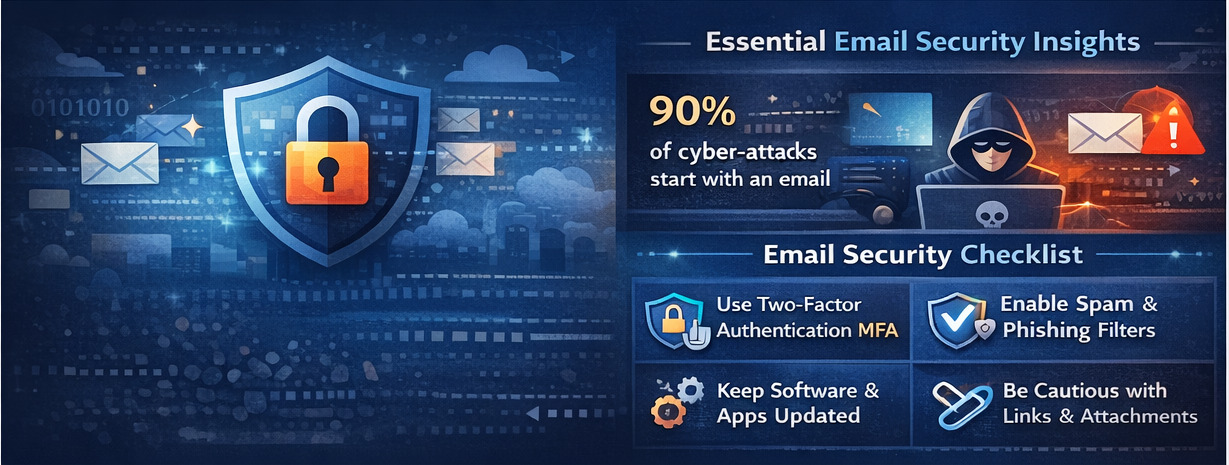
FAQ: People Also Ask
What is a good security practice for email?
Multi-layered protection. Use MFA, strong device security, and an email gateway (or built-in provider protections) that scans for malicious attachments and phishing links. Pair technical controls with user awareness training and a tested incident response plan.
What are email security best practices?
In short: enforce MFA, implement SPF/DKIM/DMARC, use anti-phishing/anti-malware gateways, enable TLS/E2EE where needed, patch servers fast, and train users regularly. These work together — don’t rely on any single control.
What are the 5 pillars of mail security?
The main pillars are: account protection, spam control, threat detection, secure communication habits, and ongoing maintenance. Together they create a strong, practical framework for email safety.
What is the 5 email rule?
People mean different things; common interpretations include the “5-sentence email” productivity rule (keep messages concise) or a personal management rule (check and triage email in five daily blocks). If you mean a security-specific “five rule” (e.g., five pillars), see the pillars section above.
Closing Thoughts
Protecting email is one of the smartest steps toward safer digital living. By combining strong authentication, careful habits, and smart privacy tools like temporary email addresses, you reduce the chances of phishing attacks, malware infections, and long-term inbox spam.
If you treat your inbox with the same care you give your phone or laptop, you’ll protect not only your email privacy but your entire online identity.
Need help keeping spam away from your main inbox? Try generating a temporary email address right here and add an instant layer of protection to your next one-time signup.
Further Reading
Professional, practical, and focused on real security — that is the true meaning of email security best practices.
Explore More Articles
Discover more insights about privacy, security, and digital communication.
View All Articles© 2026 Tempmail.world. All rights reserved.